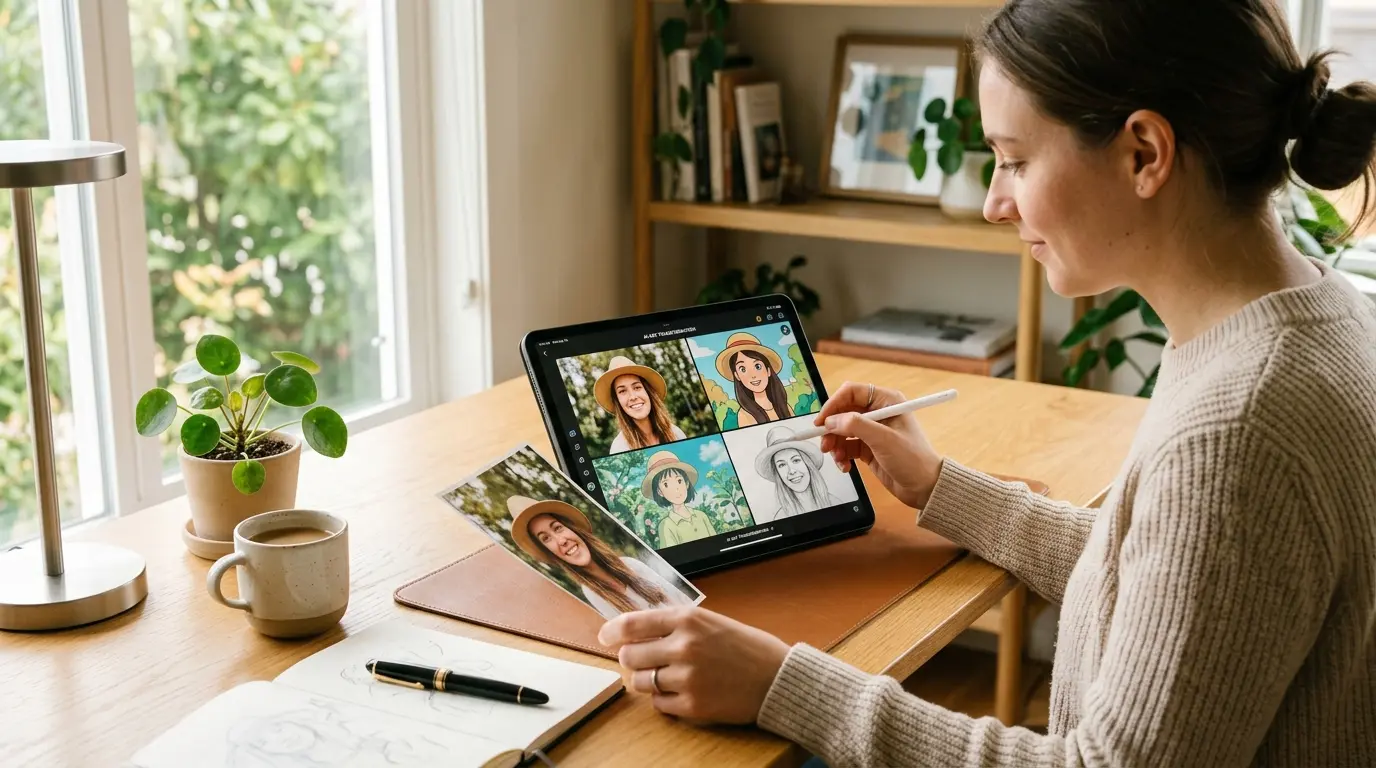
Have you ever looked at a photo and thought it would look stunning as a painting, a cartoon, or a dreamy anime scene? A few years ago that idea required a professional artist and a serious budget. Today, AI photo transformation makes it possible in minutes, often for free, with nothing more than a browser and an image you want to reimagine.
This guide covers everything worth knowing: what AI photo transformation actually is, how it works behind the scenes, which styles are trending right now, step-by-step walkthroughs for the most popular looks, and how to choose the right style for every kind of photo. By the end, you will know exactly how to turn photo into cartoon, sketch, or anime art without touching complicated software.
What Is AI Photo Transformation?
AI photo transformation is the process of using artificial intelligence to restyle or rework an existing image. Instead of manually editing pixels the way a traditional editor does, an AI model analyzes your photo, understands its structure, and rebuilds it in a new artistic style while keeping the original subject recognizable.
Think of it as a translation. Your photo speaks the language of reality, and the AI translates it into the language of cartoons, sketches, watercolor, anime, or oil paint. The face in the picture is still your face. The scene is still your scene. Only the visual style changes.
That is what separates AI photo transformation from ordinary editing. A filter only adjusts colors and brightness. A true AI photo transformation redraws the image from the ground up, producing results that often look hand made. The lines appear drawn rather than traced. The shading appears painted rather than applied. This difference is why transformed images get attention while filtered images blend into the feed.
There is also a speed story here. Manual digital painting of a single portrait can take a skilled artist several hours. An AI photo transformation of the same portrait takes seconds. That gap is not just convenient. It changes who gets to make art at all.
A Short History: From Film Stock to Full Transformation
To appreciate where we are, it helps to remember how far photo stylization has come.
- The film era. Long before software, photographers chose film stocks for their color character. Portraits and landscapes each had signature looks. Style was baked into chemistry.
- The early digital era. Editing programs brought plugins and actions that could imitate painterly strokes, but the results were mechanical. A colored pencil filter simply detected edges and painted strokes along them.
- The deep learning era. Around the mid 2010s, style transfer networks appeared. These models could genuinely borrow the texture and color palette of a painting and apply it to a photo. It was the first time software produced stylization that felt intentional.
- The diffusion era. Today, diffusion models trained on millions of images have made AI photo transformation mainstream. Results preserve faces, handle complex scenes, and offer many distinct styles from a single upload.
Each stage made style more accessible. The current stage has made it nearly effortless, and the pace of improvement shows no sign of slowing.
Why AI Photo Transformation Became So Popular
Three forces fueled the explosion of interest in AI photo transformation.
Speed. What once took an artist hours now takes seconds. You upload a photo, choose a style, and download the result before your coffee cools.
Accessibility. You do not need design training, a graphics tablet, or expensive software. Most AI photo transformation tools run in a browser, which means anyone with a phone or laptop can participate.
Social culture. Platforms like Instagram, X, and Pinterest reward fresh, eye-catching visuals. When people started sharing stylized versions of their portraits, the trend went viral fast. Forbes even published an explainer on why the AI-generated Studio Ghibli trend took over social media, and demand has not slowed since.
Put those three together and you get a creative shift where anyone can produce studio-grade art from a snapshot.
How AI Photo Transformation Works (Without the Jargon)
You do not need a machine learning degree to use these tools, but a basic understanding helps you get better results.
Modern AI photo transformation is powered mostly by diffusion models. These models are trained on millions of images, each paired with descriptions. During training, the AI learns patterns: how edges define a face, how light falls on skin, how cartoon lines differ from photographic detail.
The name is surprisingly literal. A diffusion model learns by taking clean images and gradually adding noise until they become pure static, then training itself to reverse the process. After enough repetition, the model can start from random noise and sculpt it into coherent pictures. When you supply your own photo, the model uses it as a guide while it reconstructs the scene in the target style.
So when you upload an image, the model does two jobs at once. First, it recognizes the content: the people, objects, background, and composition. Second, it applies the style rules it learned, producing a new image that matches both your content and the chosen aesthetic.
The quality of an AI photo transformation depends on three factors:
- The input photo. Sharp, well-lit images with clear subjects give the model more to work with.
- The model itself. Some models specialize in faces, others in scenery or objects. GetImg’s Ghibli Diffusion model shows how specialized training produces distinctly anime-flavored results
- The style prompt or preset. A vague request produces a vague result. Specific direction produces art.
That is the entire magic trick. No mystery, just pattern recognition applied at a massive scale.
The Most Popular AI Photo Transformation Styles
One of the best things about AI photo transformation is the range of looks available. Here are the styles people search for most, and when to use each one.
1. Cartoon Style
The classic. Cartoon transformation converts your photo into a bold, colorful illustration with clean outlines and flat shading, similar to animated shows and comic strips. It works beautifully for profile pictures, gift cards, and social posts.
If you want to try this, the image to cartoon tool converts photos into cartoon style images in a few clicks. Upload your picture, let the AI work, and download the result. We will cover a full walkthrough later in this guide.
2. Ghibli Style
The internet’s favorite. A Ghibli style photo carries the soft, nostalgic aesthetic of Japanese animation: gentle colors, painterly skies, and a warm storybook feel. It turns an ordinary selfie into a frame that looks lifted from an animated film.
The trend became so big that news outlets tracked its origins. The Economic Times published a piece on who started the AI-generated Ghibli photo trend, and it remains one of the most requested looks in AI photo transformation today. To test it yourself, try the image to Ghibli style converter, which rebuilds your image in that signature animated look.
3. Sketch and Drawing Styles
Photo to sketch styles strip your image down to pencil lines, cross-hatching, and shading. Sketch transformation is popular for portraits, wedding keepsakes, tattoo references, and custom greeting cards. There are several sub-styles worth knowing:
- Pencil sketch: soft graphite lines with realistic shading
- Charcoal sketch: dramatic dark strokes, great for moody portraits
- Line art: minimal single-weight outlines, perfect for logos and coloring books
- Ink drawing: bold contrast with a hand-drawn feel
For any of these, the image to sketch tool offers multiple artistic sketch variations from a single upload.
4. Anime and Manga Style
A close cousin to cartoon, but with the expressive eyes, detailed hair, and cel shading typical of Japanese comics. Anime style is a strong choice for gaming avatars, Discord profiles, and fan art.
5. Painting Styles
AI photo transformation can also apply classical painterly looks: oil paint, watercolor, impressionism, and more. These work well for home decor prints, book covers, and artistic portfolio pieces.
6. 3D Character Style
This look turns subjects into rounded, glossy 3D characters with exaggerated features. It is playful, shareable, and hugely popular for family photos and pet pictures.
Style Comparison at a Glance
| Style | Best For | Energy Level | Identity Accuracy |
| Cartoon | Profile pictures, gifts, social posts | Playful and bold | High |
| Ghibli | Portraits, landscapes, nostalgic scenes | Soft and dreamy | High |
| Pencil sketch | Portraits, keepsakes, tattoo art | Calm and elegant | Very high |
| Anime | Avatars, fan art, gaming | Expressive | Medium to high |
| Oil painting | Decor prints, covers, portfolios | Rich and classic | Medium |
| 3D character | Family and pet photos | Fun and lively | Medium |
Use this table as a starting point, then let experimentation refine your choices.
How to Turn Photo Into Cartoon: Step by Step
Here is the exact process for cartoon transformation, and the same flow applies to most styles.
- Pick a high-quality photo. Choose an image where your subject is sharp, well-lit, and centered. Avoid blurry pictures, heavy shadows, and cluttered backgrounds.
- Open the cartoon tool.Go to theimage to cartoon converter
- Upload your photo. Drag and drop the file or browse from your device. JPG and PNG formats are standard.
- Let the AI process it. The model analyzes the structure and applies cartoon rendering. This usually takes only a few seconds.
- Review the result. Check whether the face, pose, and expression survived the transformation.
- Download and share. Save the cartoon version to your device and post it anywhere you like.
If the first attempt misses the mark, try a different photo. AI photo transformation quality depends heavily on the input. Front-facing portraits with even lighting almost always win.
Making a Ghibli Style Photo That Actually Looks Right
Because the Ghibli aesthetic is subtle, small choices change the outcome noticeably.
- Choose photos with open skies or nature. The style is famous for clouds, meadows, and golden light. A park bench photo transforms better than a dim indoor selfie.
- Keep the composition simple. One or two subjects, clean backgrounds, gentle depth. Busy frames dilute the dreamy quality.
- Favor soft daylight. The pastel palette of a Ghibli style photo needs gentle light to look convincing.
- Include a sense of story. A person looking away from the camera, or a quiet street at dusk, gives the transformation a narrative feel that matches the aesthetic.
Getting the Most From Photo to Sketch Styles
Sketch transformation rewards different inputs than cartoon or anime. Since sketches rely on lines and shading rather than color, your priorities shift.
- Strong contrast helps. A subject against a lighter background reads better as a sketch.
- Texture becomes detail. Curly hair, knit sweaters, and foliage translate into rich hatching.
- Plain backgrounds keep focus. In pencil and line art, empty space is a design choice, not a waste.
- Test multiple variants. The same portrait can look elegant as pencil, dramatic as charcoal, and modern as line art. Comparing them side by side is the fastest way to find your favorite.
AI Photo Editor vs AI Image Generator From Photo
People often mix up two related concepts, so let us clear that up.
An AI photo editor modifies an existing image while staying close to reality. It removes backgrounds, erases objects, retouches skin, and adjusts lighting. The photo remains a photo. Adobe’s ecosystem is the best-known example, and their official page on AI photo editing features shows how professional tools now blend traditional editing with generative AI. TechRadar also maintains useful coverage of Photoshop’s AI editing tools if you want a professional perspective.
An AI image generator from photo goes further. It uses your photo as a reference and produces a completely new rendering in another style. Your portrait becomes a cartoon, sketch, or anime character. The output is a fresh image, not an edited one.
Both have their place. Use an editor when you want your photo to remain a photo. Use a generator when you want your photo to become art. Most AI photo transformation tools fall into the second category, and the two often work together: edit first to clean up the shot, then transform to restyle it.
Choosing the Right Style for Your Photo
Not every style suits every image. These quick guidelines help you match subject and style.
- Portraits and selfies: cartoon, Ghibli, anime, and pencil sketch all shine. Each keeps facial identity intact while adding character.
- Pets: cartoon and 3D character styles produce the most delightful results.
- Landscapes and travel shots: Ghibli, watercolor, and impressionist styles add atmosphere without losing the scene.
- Group photos: use styles that handle multiple faces well, such as cartoon or sketch. Complex group shots can confuse models that specialize in single faces.
- Product images: line art and clean sketch styles work well for packaging concepts and design mockups.
- Kids and family: soft Ghibli and cartoon looks create keepsake-worthy results.
A useful habit: run the same photo through two or three different styles and compare. AI photo transformation is fast enough that experimenting costs you nothing but a minute.
Tips for Getting Better Results
Follow these practices and your transformations will consistently look better.
Start with a clean photo. Crop out distractions, fix exposure if needed, and make sure your subject is in focus. Garbage in, garbage out applies fully to AI photo transformation.
Use natural lighting when shooting. Photos taken in soft daylight give the AI clearer detail to preserve, especially in faces.
Keep the subject large in the frame. Tiny, distant subjects lose detail during transformation. Fill the frame with whatever matters most.
Avoid extreme poses at first. Overhead angles, hands covering faces, and dramatic shadows can confuse models. Straight-on shots are the most reliable.
Mind the resolution. A high-resolution output deserves a high-resolution input. If you need specific dimensions afterward, the image size converter and resizer can adjust your transformed image for social platforms, app icons, or print.
Save your originals. Always keep the untouched source photo. Trends change, and you may want to try a new style on it later.
Practical Uses for AI Photo Transformation
Beyond social media fun, these tools solve real problems.
Profile pictures and avatars. A cartoon or Ghibli version of your portrait is a memorable alternative to the standard headshot, especially for gaming and creator platforms where personality matters more than polish.
Gifts and keepsakes. A pencil sketch of a wedding photo or a cartoon of a childhood picture makes a personal, affordable gift. Printed and framed, these transformations look intentional rather than digital.
Marketing and branding. Small businesses use stylized images for logos, packaging concepts, and ad creatives without hiring illustrators. A consistent style applied across product photos builds a recognizable visual identity.
Content creation. Bloggers and YouTubers use transformed images as thumbnails and illustrations, keeping a consistent look across posts. A distinctive style helps content stand out in crowded feeds.
Education and design. Teachers convert diagrams into friendly cartoon visuals, and designers build mood boards from quick style tests. Sketch and line art outputs are especially useful for worksheets and instructional material.
Creative portfolios. Photographers use AI photo transformation to show clients alternate treatments of the same shot. A single portrait rendered in five styles demonstrates range in a way one photo never could.
Documenting projects. Some creators convert a batch of transformed images into a report or portfolio document, and tools like the image to Word converter make it easy to place multiple images into a DOCX file in one go.
Common Mistakes to Avoid
Even though AI photo transformation is simple, a few habits quietly ruin results.
- Uploading low-quality photos and blaming the tool. The model cannot invent detail that was never captured. If the source is blurry, the transformation will be blurry too.
- Overusing transformations. A feed of fifty identical cartoon posts loses impact fast. Vary your styles and save transformations for moments that deserve them.
- Ignoring licensing and consent. Do not transform photos of people without their permission, and check usage rights before using generated art commercially. Different tools have different terms, so read them before a client project.
- Expecting perfection every time. AI is impressive but not flawless. Some photos simply do not translate well, and a second attempt with a different image is the fastest fix.
- Forgetting privacy. If your photo contains sensitive information or other identifiable people, consider whether you want to upload it to any online tool. Responsible use of AI photo transformation means respecting the privacy of everyone in the picture.
- Skipping the comparison step. Settling for the first result means missing better options. Running the same photo through two or three styles takes a minute and often reveals a stronger version.
Realistic Expectations: What AI Can and Cannot Do Yet
Honesty makes for better workflows, so here is where the technology stands today.
What it does well: preserving facial structure in portraits, applying consistent styles, handling single subjects with clear backgrounds, and producing images that look intentionally artistic rather than filtered.
Where it still struggles: hands in complex poses, very large groups, tiny text in the frame, and photos that are already heavily stylized. Extremely low-light images also remain a weak spot, because the model has little clean detail to interpret.
The good news is that failure is cheap here. A weak result costs you thirty seconds, so there is no reason not to retry with an adjusted input. This trial-and-error loop is not a flaw in the workflow, it is the workflow.
The Future of AI Photo Transformation
This space is moving quickly. Three trends are worth watching.
More control. New tools let users guide transformations with detailed prompts, reference images, and strength sliders, so you can decide how far the style goes. Subtle restyling and dramatic reinvention will both be one adjustment away.
Better identity preservation. Early models often distorted faces. Current models keep identity remarkably intact, and the gap keeps shrinking with each generation.
Style mixing. Combining styles, such as Ghibli backgrounds with sketch characters, is becoming mainstream, opening creative territory that manual art rarely explored. Expect tools to offer hybrid presets as a standard feature rather than an advanced option.
The tools will keep improving, but the core idea stays the same: AI photo transformation puts artistic skills that once required years of practice into everyone’s hands.
Conclusion: Start With One Photo
AI photo transformation has quietly become one of the most useful creative skills anyone can pick up, and unlike most skills, it takes minutes to learn. You now know how the technology works, which styles lead which trends, how to prepare photos for better results, and how to avoid the mistakes that frustrate first-time users.
The only step left is the fun one. Pick a photo you love, choose a style that matches its mood, and see what the AI makes of it. Try the cartoon look for something playful, the Ghibli style for something dreamy, or a sketch for something timeless. One upload is all it takes to see your own pictures in a completely new light.
Frequently Asked Questions
Is AI photo transformation free?
Many online tools offer free transformation of standard images. Heavy or batch processing may require a paid tier on some platforms, but for single portraits and casual use, free options cover most needs.
Do I need to install software?
Usually no. Most AI photo transformation tools run directly in a web browser on both desktop and mobile. If you need to resize the output afterward, a browser-based image resizer handles that too.
Will the transformed image still look like me?
Quality tools preserve facial identity well, especially with clear, front-facing photos. Results vary more with side profiles, heavy makeup, and low-light shots. When identity matters most, pencil sketch styles tend to be the most faithful.
Which style should a beginner try first?
Cartoon. It is forgiving, works with most photo types, and gives a satisfying result almost immediately. Ghibli and pencil sketch are strong second choices once you understand how your photos respond to transformation.
Can I use transformed images commercially?
It depends on the tool’s terms and the photo’s rights. Always check the license of both the tool you use and the source image, and get consent from anyone recognizable in the picture.
How many photos can I transform?
For casual use, transform as many as you like one at a time. If you need to organize many results into a document, converting batches into a Word file keeps everything tidy.
Why did my result look distorted?
Usually the input photo. Blurriness, extreme angles, harsh shadows, and cluttered backgrounds are the usual suspects. Retry with a cleaner shot and the same style, and the difference is often dramatic.