How I Turn My Photos Into Ghibli Style Masterpieces (And How You Can Too)

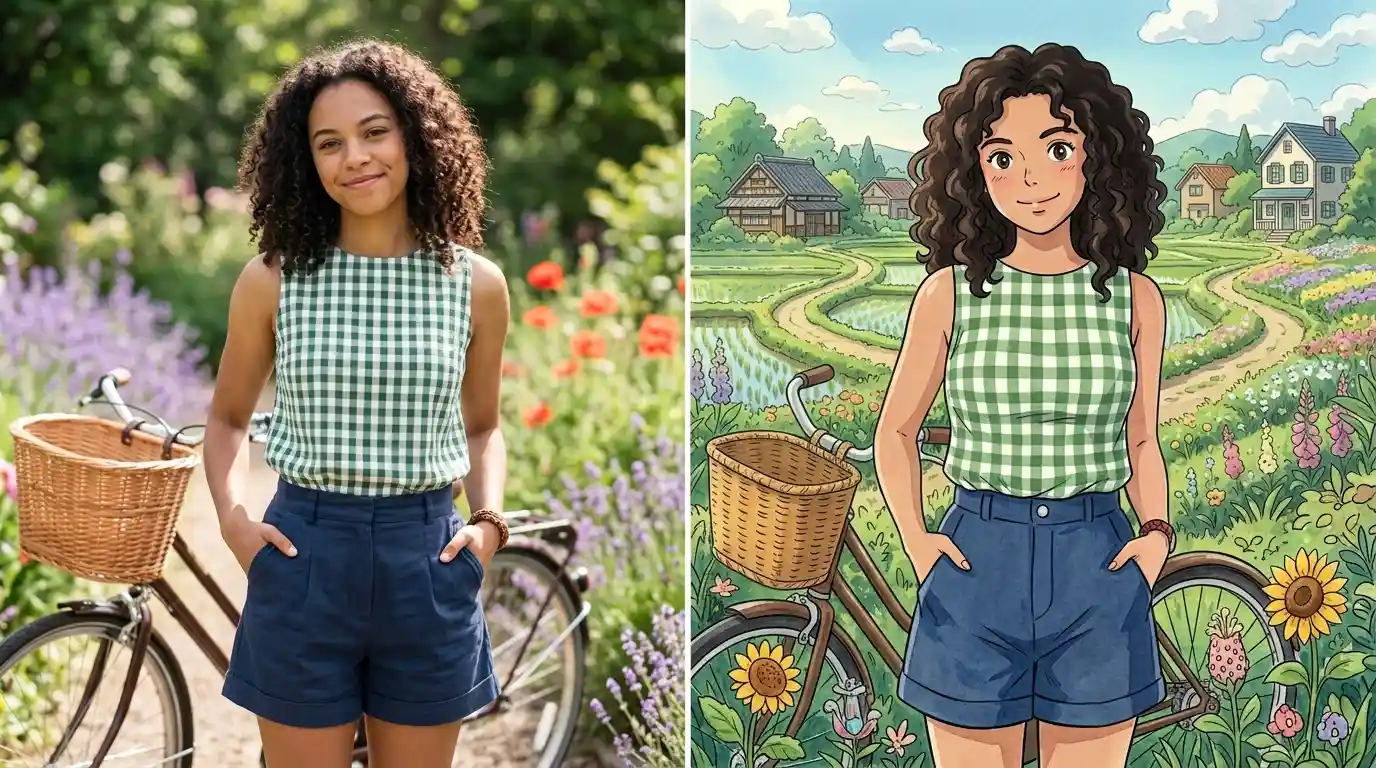
Side-by-side view of a real-world photo transformed into a painterly Ghibli style photo using AI.

I’ve spent the last few months experimenting with AI tools to transform my ordinary photos into something that looks like it belongs in a Studio Ghibli film. The results have been stunning, and honestly, it’s changed how I think about photo editing and digital art.

When I started this journey, I had no idea how many people were searching for ways to create Ghibli style images. Turns out, there’s a massive community of anime fans, artists, and creative people who want to turn their regular photos into something with that unmistakable hand-drawn, whimsical quality that Hayao Miyazaki’s films are famous for.

What Makes Ghibli Style So Special

I remember the first time I watched “Spirited Away.” The animation, the colors, the attention to detail—it all felt timeless. That’s the aesthetic everyone’s chasing when they want a Ghibli style photo. It’s not just about making something look like a cartoon. It’s about capturing that specific warmth, those soft color palettes, and that sense of wonder that makes Ghibli films feel like stepping into another world.

If you want to understand the rich history behind this visual style, the history of Studio Ghibli’s animation techniques shows how the studio evolved its distinctive approach over decades. The attention to detail and artistic philosophy shaped everything about how their films look.

The good news? You don’t need to be a professional animator to achieve this look anymore. Modern AI photo transformation technology has made it possible for anyone to take their photos and apply that beautiful Ghibli aesthetic.

The actual technical process involves something called style transfer, which is an AI technique that analyzes the visual characteristics of Ghibli films and applies them to your photos. When I first discovered this, I was skeptical. Could AI really capture the artistry and soul of hand-drawn animation? After testing it out, I can tell you it absolutely can.

Understanding Ghibli Style Image Generation

When I talk about a ghibli style image generator, I’m referring to AI tools that use neural networks trained on thousands of Ghibli film frames. These systems learn the unique characteristics of the studio’s visual style: the way light hits objects, the color grading, the linework, the texture of the animation cels, and even the emotional quality of the scenes.

The process starts with your original photo. The AI analyzes it, then applies layers of transformation. It’s not just slapping a filter on top. The generator actually repaints elements of your image, adjusts shadows and highlights to match Ghibli’s lighting style, and enhances colors in ways that feel authentic to the films.

I’ve tested this with dozens of different photos, and the results vary depending on your source material. A landscape photo of mountains? It becomes something worthy of “Princess Mononoke.” A street photo of an old building? Suddenly it looks like it’s from “Kiki’s Delivery Service.”

The Best Tools for AI Photo Transformation

Here’s what I’ve learned about image to Ghibli conversion tools: not all of them are created equal. Some produce results that look generic or overly processed. Others nail that authentic Ghibli feel while keeping your original photo recognizable.

I’ve spent time with several different platforms, and what separates the good ones from the great ones is how well they handle detail. A quality ghibli filter will preserve the important elements of your original photo while transforming the overall aesthetic. Your face in a portrait should still look like you. The architectural details in a building should still be visible. But everything should feel like it’s been painted with that beautiful, dreamy quality.

The technical backend matters here too. Some tools use older style transfer models that create blurry or unrealistic results. Better options use more recent AI models that have been specifically trained on anime and hand-drawn art styles. When I started looking for a free ghibli style AI converter without sign up, I realized that convenience and quality often come with tradeoffs.

What I really wanted was something powerful, easy to use, and accessible. That’s when I found tools that deliver exactly that: professional-quality transformations without the hassle of creating an account or paying subscription fees just to try it out.

How to Turn Photo Into Cartoon Using AI

The process of transforming your photo is simpler than you’d think. Most modern tools follow roughly the same workflow. First, you upload your image. The system analyzes it. Then it applies the transformation. Within seconds to minutes, you get your result.

I’ve learned that the quality of your input photo matters. High-resolution images work better than heavily compressed JPEGs. Good lighting in your original photo helps the AI understand what it’s working with. And composition makes a difference too. I got better results with photos that had interesting subjects and clear focal points. If you’re interested in learning more about how to apply artistic filters to photos generally, these techniques provide a good foundation for understanding what happens behind the scenes when you upload.

When I’m looking at an AI photo transformation tool, I pay attention to several things: How does it handle skin tones? Does the background look natural or does it look plasticky? Are fine details preserved or lost? Does the overall mood of the image feel enhanced or destroyed?

One thing that surprised me was how much the subject matter matters. I got incredible results transforming landscape photos, architectural shots, and nature photography. Portrait transformations require a bit more care, but when they work, they’re genuinely impressive. I’ve turned casual selfies into something that looks like official character art.

If you prefer a classic cartoon look over Ghibli, this guide covers four easy ways to turn a photo into a cartoon.

Why Ghibli Style Resonates With People

I think the reason so many people want a ghibli style photo is because there’s something deeply human about hand-drawn animation. In an era of photorealism and high-definition digital art, there’s appeal in something that looks slightly painterly, slightly imperfect, and undeniably artistic.

Studio Ghibli’s work specifically has this magical quality that transcends just the animation technique. It’s about mood, storytelling, and a particular way of looking at the world. The colors tend toward warmer tones. The lighting is often soft and forgiving. There’s a sense of discovery and wonder baked into every frame.

When you apply this aesthetic to your own photos, something interesting happens. A regular snapshot becomes something more meaningful. A street scene gets a narrative quality. A portrait becomes something that feels more intimate, more artistic, more you.

I’ve shared my transformed images with friends, and the reaction is always the same: “That’s beautiful. Where did you get this commissioned?” When I tell them it took 30 seconds with an AI tool, they’re shocked. But here’s the thing—just because it was easy doesn’t make it any less valuable as art.

Comparing Styles: Ghibli vs Other Anime Aesthetics

Not all anime styles are created equal, and I wanted to understand the differences when exploring AI art transformation options. I’ve experimented with tools that claim to offer different anime styles—everything from “Studio Ghibli” to “Attack on Titan” to generic “anime” filters.

The evolution of anime aesthetics shows how different studios developed their own visual signatures over time. Ghibli’s approach is distinctly different from other anime producers, and that’s what makes it so recognizable.

Here’s what I found: true Ghibli style is more refined and less intense than some other anime aesthetics. Where a generic anime filter might add exaggerated eyes, heavy black outlines, and dramatic shading, Ghibli style keeps things more grounded. It’s enhanced realism with an artistic touch, not cartoony transformation.

Ghibli’s style also tends to emphasize natural elements and environmental storytelling. If you’re transforming a photo of nature, the tool should enhance the organic qualities—the way light filters through leaves, the texture of water, the sense of growth and life. That’s different from an urban anime style that might emphasize architecture and technology.

I tested a ghibli style photo free converter against several paid options, and honestly, the gap has narrowed significantly. Some free tools now produce results that rival paid services. What matters more than cost is whether the tool understands what makes Ghibli actually Ghibli.

Practical Tips for Getting the Best Results

I want to share what I’ve learned through my own trial and error. If you’re serious about getting beautiful results, these tips will help.

Start with good source material. This doesn’t mean your photo needs to be professionally taken, but it should be in focus, well-lit, and clear. Blurry or overexposed photos give the AI less to work with. I got my best results with natural lighting and interesting compositions. Understanding how digital art tools handle composition and lighting can give you insights into what works best for AI transformation.

Second, consider the subject. As I mentioned, landscapes and architecture tend to produce more reliably beautiful results than portraits. But that doesn’t mean you shouldn’t try portraits—just have realistic expectations about what the transformation will look like.

Third, explore different variations if the tool allows it. Some converters let you adjust parameters like style intensity, color saturation, or artistic effect level. Playing with these settings can make a huge difference in the final result.

Fourth, don’t over-edit before uploading. Some people think they need to use traditional filters or edit their photos to look more “artistic” before applying AI transformation. Actually, the opposite is true. Feed the tool clean, unfiltered images. Let it do its thing.

Fifth, keep your original. Always preserve your source photo. Use the transformed image as something new and separate. Sometimes you’ll want the original. Sometimes you’ll prefer the transformation. Why not have both?

The Technical Side: How These Tools Actually Work

I got curious about the engineering behind all this, so I did some research. The tools that create these transformations use what’s called conditional generative adversarial networks, or cGANs. There are also transformer-based models and diffusion models that can do style transfer.

If you want to dive deeper into how this actually works, understanding neural style transfer explains the mathematical foundations and practical implementations. It’s genuinely fascinating if you’re interested in the AI side.

What that means in practical terms is the AI has been trained on images and their styles. When you upload your photo, the model doesn’t just apply a filter. It’s actually generating new pixels based on what it learned about Ghibli’s visual characteristics.

The best tools use models that have been fine-tuned specifically on Ghibli films. The AI has watched hours of footage, analyzed thousands of individual frames, learned the color palettes, understood the lighting setups, and internalized the animation techniques.

This is why using a dedicated tool outperforms general-purpose AI art generators. A general tool might know anime in broad strokes. A specialized tool knows Ghibli in intimate detail.

Processing time varies depending on the tool and your image resolution. I’ve seen transformations happen in 10 seconds and others take a couple minutes. Higher resolution usually means longer processing time but better quality results.

Real-World Applications Beyond Just Fun

I initially thought this was just a fun creative tool, but I’ve discovered legitimate applications.

Illustrators and concept artists use ghibli style transformations to explore visual ideas quickly. Instead of sketching multiple variations, they can take reference photos and generate different artistic interpretations in seconds. A photo to sketch converter is just as handy for quick line studies. It’s a brainstorming tool.

Travel photographers and bloggers use these transformations to create unique visual content for their platforms. Your travel photos stand out when they have this distinctive artistic quality. I’ve seen photographers who’ve built entire aesthetics around Ghibli-style transformed images.

People in the animation or game development industry use these tools to generate mood boards and visual references. Need to show a client what a particular scene might look like with a Ghibli aesthetic? Transform a reference photo instantly.

Digital marketers have started using Ghibli-style images in their campaigns. There’s something about the aesthetic that catches attention and stands out from typical photography or standard illustration.

Finding the Right Tool for You

Now, I need to be honest about something. If you try a free tool and don’t get results you love, that doesn’t mean the aesthetic can’t work for you. It usually means that particular tool wasn’t the right fit for your image or needs.

I’ve tried tools that were:

  • Too aggressive with the stylization
  • Not aggressive enough
  • Good with landscapes but bad with portraits
  • Great with color but destructive with detail
  • Fast but lower quality
  • High quality but slow

The best approach is trying a few different options. Look for tools that let you upload a sample without commitment. Test with a few different photos. See which one consistently produces results you’re happy with.

When you find image to cartoon transformations that work, you’ll know. The image will feel right. It’ll look artistic without looking fake. It’ll enhance your original photo rather than replace it.

Understanding Search Intent Behind This Trend

I’ve been curious about why this has become such a popular search. Why do so many people want their photos to look like they’re from a Ghibli film?

Part of it is pure nostalgia and fandom. Studio Ghibli films have touched millions of people around the world. The visual style is iconic and beloved. Of course people want to apply that aesthetic to their own images.

Part of it is the desire for something more artistic than photography but more personal than illustration. A photo is documentary. A Ghibli transformation is interpretation. It’s the same scene but seen through an artistic lens.

And part of it is how accessible this has become. The barrier to entry is essentially zero. You don’t need skills, software knowledge, or investment. You upload a photo and get results. That simplicity has made the trend explosive.

I think we’re also seeing a broader cultural shift where people want to engage with AI technology in creative, personal ways. Not for scaling up business processes, but for making their personal creative work better. This trend exemplifies that perfectly.

The Ethics and Future of AI Photo Transformation

I want to address something that comes up: Is using these tools “cheating” in some artistic sense?

My take? No. These are tools, like Photoshop, like cameras, like paintbrushes. A photographer isn’t “cheating” by using a camera instead of drawing by hand. Someone using Photoshop isn’t cheating compared to hand-painting. And using AI to explore artistic styles isn’t cheating compared to doing it all manually.

The skill is in knowing what transformation to apply, knowing which source photos work best, understanding composition and lighting, and having an artistic eye for what looks good. The tool does the heavy lifting, but you direct it.

Looking forward, I expect these tools to get even better. Training models on more specific artistic styles will be possible. Real-time preview might become standard. Maybe eventually we’ll see this built into standard photo editing software like Lightroom.

The key thing I hope people remember is that these transformations should enhance your creativity, not replace it. Use them as a starting point, as inspiration, as a way to see your photos differently. They’re not substitutes for learning photography or art. They’re augmentations.

Getting Started With Your Own Transformation

Here’s my recommendation if you want to try this yourself. Start simple. Pick a photo you like. Upload it to a tool. See what happens. You might be amazed at the result.

If the first result isn’t quite right, try a different photo or a different tool. The learning curve is extremely gentle because you get instant feedback.

Once you find results you love, think about how you want to use these images. Are you creating for social media? For personal enjoyment? For your blog or website? Context matters for which tool you should use.

And if you find AI photo transformation genuinely interesting, there’s a whole ecosystem of related tools worth exploring. This is just the beginning of what’s possible with AI-assisted creative work.

The Bottom Line

I’ve spent considerable time exploring how to create Ghibli style photos, testing different tools, and seeing what works and what doesn’t. My conclusion? This is genuinely transformative technology that’s becoming more accessible every day.

The transformation from regular photo to something that looks hand-drawn and artistic is remarkable. Whether you’re doing this for fun, for creative projects, or for your professional work, the capability is there and it’s getting better.

If you’re curious about what your own photos might look like in Ghibli style, I recommend trying it. The investment is minimal—just a few seconds of your time uploading an image. The potential outcome is genuinely beautiful artwork that you’ll be proud to share.

The world of AI photo transformation is evolving quickly. Better tools are emerging. Models are getting more sophisticated. But the core magic remains the same: taking your personal photos and seeing them reimagined through the lens of art you love.

Start exploring Ghibli style transformations with your favorite photos today. You might just surprise yourself with what’s possible.

Frequently Asked Questions About Ghibli Style Photos

Do I need to be an artist to use these tools?

No. The entire point is that they’re designed for people without artistic skills or technical knowledge. If you can upload a photo and click a button, you can create these images.

Will my photo get distorted or look completely different?

The best tools preserve recognizability while changing the artistic style. Your photo should still be identifiable as the original subject, just with Ghibli aesthetic applied.

Q: What’s the difference between Ghibli style and other anime styles?

Ghibli style is typically softer, more refined, and more grounded in reality than other anime aesthetics. It emphasizes natural elements and emotional storytelling rather than exaggerated features.

Can I use these transformed images commercially?

This depends on your tool and its terms of service. Some allow commercial use, some don’t. Always check the tool’s licensing before using transformed images in business applications.

How does the quality compare between free and paid tools?

The gap has narrowed significantly. Many free tools now produce professional-quality results. What matters more than price is whether the tool is specifically trained on Ghibli films.

What file formats should I upload?

Most tools accept JPG, PNG, and sometimes WebP. Higher resolution files produce better results. I recommend uploading at least 1000 pixels on the longest dimension.

Can I transform old or low-quality photos?

It’s possible, but results may be less impressive. The AI has less detail to work with, so the transformation might look soft or lack fine details. Modern, well-lit photos produce better results.

How long does the transformation take?

Most tools complete transformations in 10 seconds to 2 minutes depending on image size and server load. Some offer priority processing for faster results.

Can I edit the transformed image afterward?

Yes. Treat transformed images like any other digital image. You can edit them further in Photoshop, Lightroom, or any standard photo editor if you want to fine-tune results.

Will I get the exact same transformation if I upload the same photo twice?

Most tools use the same model for processing, so results should be consistent. However, some tools include random elements in their processing, which might create slight variations in multiple transformations of the same image.
AI Photo Transformation: Turn Any Photo Into Art in Minutes

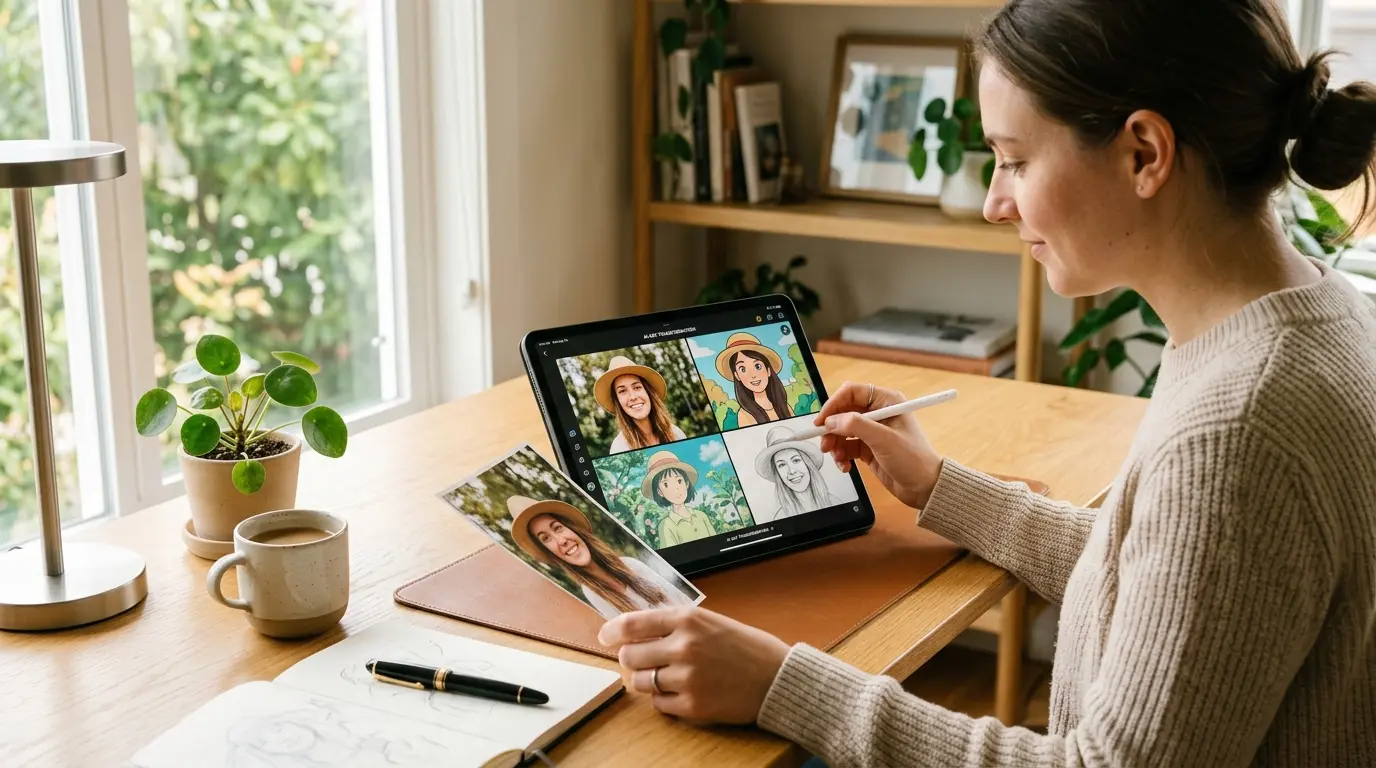
Before and after of AI photo transformation into cartoon art styles

Have you ever looked at a photo and thought it would look stunning as a painting, a cartoon, or a dreamy anime scene? A few years ago that idea required a professional artist and a serious budget. Today, AI photo transformation makes it possible in minutes, often for free, with nothing more than a browser and an image you want to reimagine.

This guide covers everything worth knowing: what AI photo transformation actually is, how it works behind the scenes, which styles are trending right now, step-by-step walkthroughs for the most popular looks, and how to choose the right style for every kind of photo. By the end, you will know exactly how to turn photo into cartoon, sketch, or anime art without touching complicated software.

What Is AI Photo Transformation?

AI photo transformation is the process of using artificial intelligence to restyle or rework an existing image. Instead of manually editing pixels the way a traditional editor does, an AI model analyzes your photo, understands its structure, and rebuilds it in a new artistic style while keeping the original subject recognizable.

Think of it as a translation. Your photo speaks the language of reality, and the AI translates it into the language of cartoons, sketches, watercolor, anime, or oil paint. The face in the picture is still your face. The scene is still your scene. Only the visual style changes.

That is what separates AI photo transformation from ordinary editing. A filter only adjusts colors and brightness. A true AI photo transformation redraws the image from the ground up, producing results that often look hand made. The lines appear drawn rather than traced. The shading appears painted rather than applied. This difference is why transformed images get attention while filtered images blend into the feed.

There is also a speed story here. Manual digital painting of a single portrait can take a skilled artist several hours. An AI photo transformation of the same portrait takes seconds. That gap is not just convenient. It changes who gets to make art at all.

A Short History: From Film Stock to Full Transformation

To appreciate where we are, it helps to remember how far photo stylization has come.

  • The film era. Long before software, photographers chose film stocks for their color character. Portraits and landscapes each had signature looks. Style was baked into chemistry.
  • The early digital era. Editing programs brought plugins and actions that could imitate painterly strokes, but the results were mechanical. A colored pencil filter simply detected edges and painted strokes along them.
  • The deep learning era. Around the mid 2010s, style transfer networks appeared. These models could genuinely borrow the texture and color palette of a painting and apply it to a photo. It was the first time software produced stylization that felt intentional.
  • The diffusion era. Today, diffusion models trained on millions of images have made AI photo transformation mainstream. Results preserve faces, handle complex scenes, and offer many distinct styles from a single upload.

Each stage made style more accessible. The current stage has made it nearly effortless, and the pace of improvement shows no sign of slowing.

Why AI Photo Transformation Became So Popular

Three forces fueled the explosion of interest in AI photo transformation.

Speed. What once took an artist hours now takes seconds. You upload a photo, choose a style, and download the result before your coffee cools.

Accessibility. You do not need design training, a graphics tablet, or expensive software. Most AI photo transformation tools run in a browser, which means anyone with a phone or laptop can participate.

Social culture. Platforms like Instagram, X, and Pinterest reward fresh, eye-catching visuals. When people started sharing stylized versions of their portraits, the trend went viral fast. Forbes even published an explainer on why the AI-generated Studio Ghibli trend took over social media, and demand has not slowed since.

Put those three together and you get a creative shift where anyone can produce studio-grade art from a snapshot.

How AI Photo Transformation Works (Without the Jargon)

You do not need a machine learning degree to use these tools, but a basic understanding helps you get better results.

Modern AI photo transformation is powered mostly by diffusion models. These models are trained on millions of images, each paired with descriptions. During training, the AI learns patterns: how edges define a face, how light falls on skin, how cartoon lines differ from photographic detail.

The name is surprisingly literal. A diffusion model learns by taking clean images and gradually adding noise until they become pure static, then training itself to reverse the process. After enough repetition, the model can start from random noise and sculpt it into coherent pictures. When you supply your own photo, the model uses it as a guide while it reconstructs the scene in the target style.

So when you upload an image, the model does two jobs at once. First, it recognizes the content: the people, objects, background, and composition. Second, it applies the style rules it learned, producing a new image that matches both your content and the chosen aesthetic.

The quality of an AI photo transformation depends on three factors:

  • The input photo. Sharp, well-lit images with clear subjects give the model more to work with.
  • The model itself. Some models specialize in faces, others in scenery or objects. GetImg’s Ghibli Diffusion model shows how specialized training produces distinctly anime-flavored results
  • The style prompt or preset. A vague request produces a vague result. Specific direction produces art.

That is the entire magic trick. No mystery, just pattern recognition applied at a massive scale.

The Most Popular AI Photo Transformation Styles

One of the best things about AI photo transformation is the range of looks available. Here are the styles people search for most, and when to use each one.

1. Cartoon Style

The classic. Cartoon transformation converts your photo into a bold, colorful illustration with clean outlines and flat shading, similar to animated shows and comic strips. It works beautifully for profile pictures, gift cards, and social posts.

If you want to try this, the image to cartoon tool converts photos into cartoon style images in a few clicks. Upload your picture, let the AI work, and download the result. We will cover a full walkthrough later in this guide.

2. Ghibli Style

The internet’s favorite. A Ghibli style photo carries the soft, nostalgic aesthetic of Japanese animation: gentle colors, painterly skies, and a warm storybook feel. It turns an ordinary selfie into a frame that looks lifted from an animated film.

The trend became so big that news outlets tracked its origins. The Economic Times published a piece on who started the AI-generated Ghibli photo trend, and it remains one of the most requested looks in AI photo transformation today. To test it yourself, try the image to Ghibli style converter, which rebuilds your image in that signature animated look.

3. Sketch and Drawing Styles

Photo to sketch styles strip your image down to pencil lines, cross-hatching, and shading. Sketch transformation is popular for portraits, wedding keepsakes, tattoo references, and custom greeting cards. There are several sub-styles worth knowing:

  • Pencil sketch: soft graphite lines with realistic shading
  • Charcoal sketch: dramatic dark strokes, great for moody portraits
  • Line art: minimal single-weight outlines, perfect for logos and coloring books
  • Ink drawing: bold contrast with a hand-drawn feel

For any of these, the image to sketch tool offers multiple artistic sketch variations from a single upload.

4. Anime and Manga Style

A close cousin to cartoon, but with the expressive eyes, detailed hair, and cel shading typical of Japanese comics. Anime style is a strong choice for gaming avatars, Discord profiles, and fan art.

5. Painting Styles

AI photo transformation can also apply classical painterly looks: oil paint, watercolor, impressionism, and more. These work well for home decor prints, book covers, and artistic portfolio pieces.

6. 3D Character Style

This look turns subjects into rounded, glossy 3D characters with exaggerated features. It is playful, shareable, and hugely popular for family photos and pet pictures.

Style Comparison at a Glance

StyleBest ForEnergy LevelIdentity Accuracy
CartoonProfile pictures, gifts, social postsPlayful and boldHigh
GhibliPortraits, landscapes, nostalgic scenesSoft and dreamyHigh
Pencil sketchPortraits, keepsakes, tattoo artCalm and elegantVery high
AnimeAvatars, fan art, gamingExpressiveMedium to high
Oil paintingDecor prints, covers, portfoliosRich and classicMedium
3D characterFamily and pet photosFun and livelyMedium

Use this table as a starting point, then let experimentation refine your choices.

How to Turn Photo Into Cartoon: Step by Step

Here is the exact process for cartoon transformation, and the same flow applies to most styles.

  1. Pick a high-quality photo. Choose an image where your subject is sharp, well-lit, and centered. Avoid blurry pictures, heavy shadows, and cluttered backgrounds.
  2. Open the cartoon tool.Go to theimage to cartoon converter
  3. Upload your photo. Drag and drop the file or browse from your device. JPG and PNG formats are standard.
  4. Let the AI process it. The model analyzes the structure and applies cartoon rendering. This usually takes only a few seconds.
  5. Review the result. Check whether the face, pose, and expression survived the transformation.
  6. Download and share. Save the cartoon version to your device and post it anywhere you like.

If the first attempt misses the mark, try a different photo. AI photo transformation quality depends heavily on the input. Front-facing portraits with even lighting almost always win.
If you want every method in detail, including GIMP and phone apps, read our step-by-step guide to turning a photo into a cartoon.

Making a Ghibli Style Photo That Actually Looks Right

Because the Ghibli aesthetic is subtle, small choices change the outcome noticeably.

  • Choose photos with open skies or nature. The style is famous for clouds, meadows, and golden light. A park bench photo transforms better than a dim indoor selfie.
  • Keep the composition simple. One or two subjects, clean backgrounds, gentle depth. Busy frames dilute the dreamy quality.
  • Favor soft daylight. The pastel palette of a Ghibli style photo needs gentle light to look convincing.
  • Include a sense of story. A person looking away from the camera, or a quiet street at dusk, gives the transformation a narrative feel that matches the aesthetic.

Getting the Most From Photo to Sketch Styles

Sketch transformation rewards different inputs than cartoon or anime. Since sketches rely on lines and shading rather than color, your priorities shift.

  • Strong contrast helps. A subject against a lighter background reads better as a sketch.
  • Texture becomes detail. Curly hair, knit sweaters, and foliage translate into rich hatching.
  • Plain backgrounds keep focus. In pencil and line art, empty space is a design choice, not a waste.
  • Test multiple variants. The same portrait can look elegant as pencil, dramatic as charcoal, and modern as line art. Comparing them side by side is the fastest way to find your favorite.

For real before/after examples and source-photo tips, see how I turn my photos into Ghibli style art.

AI Photo Editor vs AI Image Generator From Photo

People often mix up two related concepts, so let us clear that up.

An AI photo editor modifies an existing image while staying close to reality. It removes backgrounds, erases objects, retouches skin, and adjusts lighting. The photo remains a photo. Adobe’s ecosystem is the best-known example, and their official page on AI photo editing features shows how professional tools now blend traditional editing with generative AI. TechRadar also maintains useful coverage of Photoshop’s AI editing tools if you want a professional perspective.

An AI image generator from photo goes further. It uses your photo as a reference and produces a completely new rendering in another style. Your portrait becomes a cartoon, sketch, or anime character. The output is a fresh image, not an edited one.

Both have their place. Use an editor when you want your photo to remain a photo. Use a generator when you want your photo to become art. Most AI photo transformation tools fall into the second category, and the two often work together: edit first to clean up the shot, then transform to restyle it.

Choosing the Right Style for Your Photo

Not every style suits every image. These quick guidelines help you match subject and style.

  • Portraits and selfies: cartoon, Ghibli, anime, and pencil sketch all shine. Each keeps facial identity intact while adding character.
  • Pets: cartoon and 3D character styles produce the most delightful results.
  • Landscapes and travel shots: Ghibli, watercolor, and impressionist styles add atmosphere without losing the scene.
  • Group photos: use styles that handle multiple faces well, such as cartoon or sketch. Complex group shots can confuse models that specialize in single faces.
  • Product images: line art and clean sketch styles work well for packaging concepts and design mockups.
  • Kids and family: soft Ghibli and cartoon looks create keepsake-worthy results.

A useful habit: run the same photo through two or three different styles and compare. AI photo transformation is fast enough that experimenting costs you nothing but a minute.

Tips for Getting Better Results

Follow these practices and your transformations will consistently look better.

Start with a clean photo. Crop out distractions, fix exposure if needed, and make sure your subject is in focus. Garbage in, garbage out applies fully to AI photo transformation.

Use natural lighting when shooting. Photos taken in soft daylight give the AI clearer detail to preserve, especially in faces.

Keep the subject large in the frame. Tiny, distant subjects lose detail during transformation. Fill the frame with whatever matters most.

Avoid extreme poses at first. Overhead angles, hands covering faces, and dramatic shadows can confuse models. Straight-on shots are the most reliable.

Mind the resolution. A high-resolution output deserves a high-resolution input. If you need specific dimensions afterward, the image size converter and resizer can adjust your transformed image for social platforms, app icons, or print.

Save your originals. Always keep the untouched source photo. Trends change, and you may want to try a new style on it later.

Practical Uses for AI Photo Transformation

Beyond social media fun, these tools solve real problems.

Profile pictures and avatars. A cartoon or Ghibli version of your portrait is a memorable alternative to the standard headshot, especially for gaming and creator platforms where personality matters more than polish.

Gifts and keepsakes. A pencil sketch of a wedding photo or a cartoon of a childhood picture makes a personal, affordable gift. Printed and framed, these transformations look intentional rather than digital.

Marketing and branding. Small businesses use stylized images for logos, packaging concepts, and ad creatives without hiring illustrators. A consistent style applied across product photos builds a recognizable visual identity.

Content creation. Bloggers and YouTubers use transformed images as thumbnails and illustrations, keeping a consistent look across posts. I share more ideas in these free image hacks for content creators. A distinctive style helps content stand out in crowded feeds.

Education and design. Teachers convert diagrams into friendly cartoon visuals, and designers build mood boards from quick style tests. Sketch and line art outputs are especially useful for worksheets and instructional material.

Creative portfolios. Photographers use AI photo transformation to show clients alternate treatments of the same shot. A single portrait rendered in five styles demonstrates range in a way one photo never could.

Documenting projects. Some creators convert a batch of transformed images into a report or portfolio document, and tools like the image to Word converter make it easy to place multiple images into a DOCX file in one go.

Common Mistakes to Avoid

Even though AI photo transformation is simple, a few habits quietly ruin results.

  • Uploading low-quality photos and blaming the tool. The model cannot invent detail that was never captured. If the source is blurry, the transformation will be blurry too.
  • Overusing transformations. A feed of fifty identical cartoon posts loses impact fast. Vary your styles and save transformations for moments that deserve them.
  • Ignoring licensing and consent. Do not transform photos of people without their permission, and check usage rights before using generated art commercially. Different tools have different terms, so read them before a client project.
  • Expecting perfection every time. AI is impressive but not flawless. Some photos simply do not translate well, and a second attempt with a different image is the fastest fix.
  • Forgetting privacy. If your photo contains sensitive information or other identifiable people, consider whether you want to upload it to any online tool. Responsible use of AI photo transformation means respecting the privacy of everyone in the picture.
  • Skipping the comparison step. Settling for the first result means missing better options. Running the same photo through two or three styles takes a minute and often reveals a stronger version.

Realistic Expectations: What AI Can and Cannot Do Yet

Honesty makes for better workflows, so here is where the technology stands today.

What it does well: preserving facial structure in portraits, applying consistent styles, handling single subjects with clear backgrounds, and producing images that look intentionally artistic rather than filtered.

Where it still struggles: hands in complex poses, very large groups, tiny text in the frame, and photos that are already heavily stylized. Extremely low-light images also remain a weak spot, because the model has little clean detail to interpret.

The good news is that failure is cheap here. A weak result costs you thirty seconds, so there is no reason not to retry with an adjusted input. This trial-and-error loop is not a flaw in the workflow, it is the workflow.

The Future of AI Photo Transformation

This space is moving quickly. Three trends are worth watching.

More control. New tools let users guide transformations with detailed prompts, reference images, and strength sliders, so you can decide how far the style goes. Subtle restyling and dramatic reinvention will both be one adjustment away.

Better identity preservation. Early models often distorted faces. Current models keep identity remarkably intact, and the gap keeps shrinking with each generation.

Style mixing. Combining styles, such as Ghibli backgrounds with sketch characters, is becoming mainstream, opening creative territory that manual art rarely explored. Expect tools to offer hybrid presets as a standard feature rather than an advanced option.

The tools will keep improving, but the core idea stays the same: AI photo transformation puts artistic skills that once required years of practice into everyone’s hands.

Conclusion: Start With One Photo

AI photo transformation has quietly become one of the most useful creative skills anyone can pick up, and unlike most skills, it takes minutes to learn. You now know how the technology works, which styles lead which trends, how to prepare photos for better results, and how to avoid the mistakes that frustrate first-time users.

The only step left is the fun one. Pick a photo you love, choose a style that matches its mood, and see what the AI makes of it. Try the cartoon look for something playful, the Ghibli style for something dreamy, or a sketch for something timeless. One upload is all it takes to see your own pictures in a completely new light.

Frequently Asked Questions

Is AI photo transformation free?

Many online tools offer free transformation of standard images. Heavy or batch processing may require a paid tier on some platforms, but for single portraits and casual use, free options cover most needs.

Do I need to install software?

Usually no. Most AI photo transformation tools run directly in a web browser on both desktop and mobile. If you need to resize the output afterward, a browser-based image resizer handles that too.

Will the transformed image still look like me?

Quality tools preserve facial identity well, especially with clear, front-facing photos. Results vary more with side profiles, heavy makeup, and low-light shots. When identity matters most, pencil sketch styles tend to be the most faithful.

Which style should a beginner try first?

Cartoon. It is forgiving, works with most photo types, and gives a satisfying result almost immediately. Ghibli and pencil sketch are strong second choices once you understand how your photos respond to transformation.

Can I use transformed images commercially?

It depends on the tool’s terms and the photo’s rights. Always check the license of both the tool you use and the source image, and get consent from anyone recognizable in the picture.

How many photos can I transform?

For casual use, transform as many as you like one at a time. If you need to organize many results into a document, converting batches into a Word file keeps everything tidy.

Why did my result look distorted?

Usually the input photo. Blurriness, extreme angles, harsh shadows, and cluttered backgrounds are the usual suspects. Retry with a cleaner shot and the same style, and the difference is often dramatic.