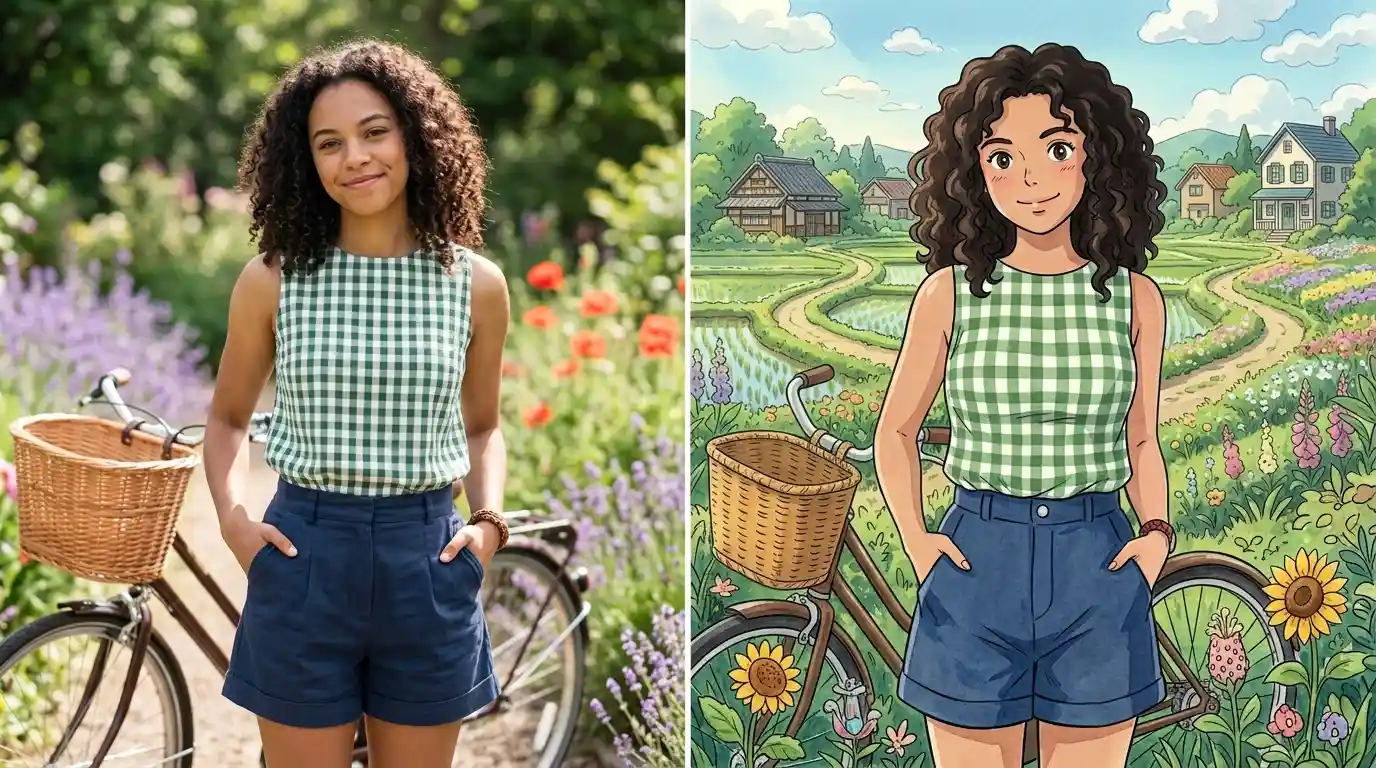
I’ve spent the last few months experimenting with AI tools to transform my ordinary photos into something that looks like it belongs in a Studio Ghibli film. The results have been stunning, and honestly, it’s changed how I think about photo editing and digital art.
When I started this journey, I had no idea how many people were searching for ways to create Ghibli style images. Turns out, there’s a massive community of anime fans, artists, and creative people who want to turn their regular photos into something with that unmistakable hand-drawn, whimsical quality that Hayao Miyazaki’s films are famous for.
What Makes Ghibli Style So Special
I remember the first time I watched “Spirited Away.” The animation, the colors, the attention to detail—it all felt timeless. That’s the aesthetic everyone’s chasing when they want a Ghibli style photo. It’s not just about making something look like a cartoon. It’s about capturing that specific warmth, those soft color palettes, and that sense of wonder that makes Ghibli films feel like stepping into another world.
If you want to understand the rich history behind this visual style, the history of Studio Ghibli’s animation techniques shows how the studio evolved its distinctive approach over decades. The attention to detail and artistic philosophy shaped everything about how their films look.
The good news? You don’t need to be a professional animator to achieve this look anymore. Modern AI photo transformation technology has made it possible for anyone to take their photos and apply that beautiful Ghibli aesthetic.
The actual technical process involves something called style transfer, which is an AI technique that analyzes the visual characteristics of Ghibli films and applies them to your photos. When I first discovered this, I was skeptical. Could AI really capture the artistry and soul of hand-drawn animation? After testing it out, I can tell you it absolutely can.
Understanding Ghibli Style Image Generation
When I talk about a ghibli style image generator, I’m referring to AI tools that use neural networks trained on thousands of Ghibli film frames. These systems learn the unique characteristics of the studio’s visual style: the way light hits objects, the color grading, the linework, the texture of the animation cels, and even the emotional quality of the scenes.
The process starts with your original photo. The AI analyzes it, then applies layers of transformation. It’s not just slapping a filter on top. The generator actually repaints elements of your image, adjusts shadows and highlights to match Ghibli’s lighting style, and enhances colors in ways that feel authentic to the films.
I’ve tested this with dozens of different photos, and the results vary depending on your source material. A landscape photo of mountains? It becomes something worthy of “Princess Mononoke.” A street photo of an old building? Suddenly it looks like it’s from “Kiki’s Delivery Service.”
The Best Tools for AI Photo Transformation
Here’s what I’ve learned about image to Ghibli conversion tools: not all of them are created equal. Some produce results that look generic or overly processed. Others nail that authentic Ghibli feel while keeping your original photo recognizable.
I’ve spent time with several different platforms, and what separates the good ones from the great ones is how well they handle detail. A quality ghibli filter will preserve the important elements of your original photo while transforming the overall aesthetic. Your face in a portrait should still look like you. The architectural details in a building should still be visible. But everything should feel like it’s been painted with that beautiful, dreamy quality.
The technical backend matters here too. Some tools use older style transfer models that create blurry or unrealistic results. Better options use more recent AI models that have been specifically trained on anime and hand-drawn art styles. When I started looking for a free ghibli style AI converter without sign up, I realized that convenience and quality often come with tradeoffs.
What I really wanted was something powerful, easy to use, and accessible. That’s when I found tools that deliver exactly that: professional-quality transformations without the hassle of creating an account or paying subscription fees just to try it out.
How to Turn Photo Into Cartoon Using AI
The process of transforming your photo is simpler than you’d think. Most modern tools follow roughly the same workflow. First, you upload your image. The system analyzes it. Then it applies the transformation. Within seconds to minutes, you get your result.
I’ve learned that the quality of your input photo matters. High-resolution images work better than heavily compressed JPEGs. Good lighting in your original photo helps the AI understand what it’s working with. And composition makes a difference too. I got better results with photos that had interesting subjects and clear focal points. If you’re interested in learning more about how to apply artistic filters to photos generally, these techniques provide a good foundation for understanding what happens behind the scenes when you upload.
When I’m looking at an AI photo transformation tool, I pay attention to several things: How does it handle skin tones? Does the background look natural or does it look plasticky? Are fine details preserved or lost? Does the overall mood of the image feel enhanced or destroyed?
One thing that surprised me was how much the subject matter matters. I got incredible results transforming landscape photos, architectural shots, and nature photography. Portrait transformations require a bit more care, but when they work, they’re genuinely impressive. I’ve turned casual selfies into something that looks like official character art.
If you prefer a classic cartoon look over Ghibli, this guide covers four easy ways to turn a photo into a cartoon.
Why Ghibli Style Resonates With People
I think the reason so many people want a ghibli style photo is because there’s something deeply human about hand-drawn animation. In an era of photorealism and high-definition digital art, there’s appeal in something that looks slightly painterly, slightly imperfect, and undeniably artistic.
Studio Ghibli’s work specifically has this magical quality that transcends just the animation technique. It’s about mood, storytelling, and a particular way of looking at the world. The colors tend toward warmer tones. The lighting is often soft and forgiving. There’s a sense of discovery and wonder baked into every frame.
When you apply this aesthetic to your own photos, something interesting happens. A regular snapshot becomes something more meaningful. A street scene gets a narrative quality. A portrait becomes something that feels more intimate, more artistic, more you.
I’ve shared my transformed images with friends, and the reaction is always the same: “That’s beautiful. Where did you get this commissioned?” When I tell them it took 30 seconds with an AI tool, they’re shocked. But here’s the thing—just because it was easy doesn’t make it any less valuable as art.
Comparing Styles: Ghibli vs Other Anime Aesthetics
Not all anime styles are created equal, and I wanted to understand the differences when exploring AI art transformation options. I’ve experimented with tools that claim to offer different anime styles—everything from “Studio Ghibli” to “Attack on Titan” to generic “anime” filters.
The evolution of anime aesthetics shows how different studios developed their own visual signatures over time. Ghibli’s approach is distinctly different from other anime producers, and that’s what makes it so recognizable.
Here’s what I found: true Ghibli style is more refined and less intense than some other anime aesthetics. Where a generic anime filter might add exaggerated eyes, heavy black outlines, and dramatic shading, Ghibli style keeps things more grounded. It’s enhanced realism with an artistic touch, not cartoony transformation.
Ghibli’s style also tends to emphasize natural elements and environmental storytelling. If you’re transforming a photo of nature, the tool should enhance the organic qualities—the way light filters through leaves, the texture of water, the sense of growth and life. That’s different from an urban anime style that might emphasize architecture and technology.
I tested a ghibli style photo free converter against several paid options, and honestly, the gap has narrowed significantly. Some free tools now produce results that rival paid services. What matters more than cost is whether the tool understands what makes Ghibli actually Ghibli.
Practical Tips for Getting the Best Results
I want to share what I’ve learned through my own trial and error. If you’re serious about getting beautiful results, these tips will help.
Start with good source material. This doesn’t mean your photo needs to be professionally taken, but it should be in focus, well-lit, and clear. Blurry or overexposed photos give the AI less to work with. I got my best results with natural lighting and interesting compositions. Understanding how digital art tools handle composition and lighting can give you insights into what works best for AI transformation.
Second, consider the subject. As I mentioned, landscapes and architecture tend to produce more reliably beautiful results than portraits. But that doesn’t mean you shouldn’t try portraits—just have realistic expectations about what the transformation will look like.
Third, explore different variations if the tool allows it. Some converters let you adjust parameters like style intensity, color saturation, or artistic effect level. Playing with these settings can make a huge difference in the final result.
Fourth, don’t over-edit before uploading. Some people think they need to use traditional filters or edit their photos to look more “artistic” before applying AI transformation. Actually, the opposite is true. Feed the tool clean, unfiltered images. Let it do its thing.
Fifth, keep your original. Always preserve your source photo. Use the transformed image as something new and separate. Sometimes you’ll want the original. Sometimes you’ll prefer the transformation. Why not have both?
The Technical Side: How These Tools Actually Work
I got curious about the engineering behind all this, so I did some research. The tools that create these transformations use what’s called conditional generative adversarial networks, or cGANs. There are also transformer-based models and diffusion models that can do style transfer.
If you want to dive deeper into how this actually works, understanding neural style transfer explains the mathematical foundations and practical implementations. It’s genuinely fascinating if you’re interested in the AI side.
What that means in practical terms is the AI has been trained on images and their styles. When you upload your photo, the model doesn’t just apply a filter. It’s actually generating new pixels based on what it learned about Ghibli’s visual characteristics.
The best tools use models that have been fine-tuned specifically on Ghibli films. The AI has watched hours of footage, analyzed thousands of individual frames, learned the color palettes, understood the lighting setups, and internalized the animation techniques.
This is why using a dedicated tool outperforms general-purpose AI art generators. A general tool might know anime in broad strokes. A specialized tool knows Ghibli in intimate detail.
Processing time varies depending on the tool and your image resolution. I’ve seen transformations happen in 10 seconds and others take a couple minutes. Higher resolution usually means longer processing time but better quality results.
Real-World Applications Beyond Just Fun
I initially thought this was just a fun creative tool, but I’ve discovered legitimate applications.
Illustrators and concept artists use ghibli style transformations to explore visual ideas quickly. Instead of sketching multiple variations, they can take reference photos and generate different artistic interpretations in seconds. It’s a brainstorming tool.
Travel photographers and bloggers use these transformations to create unique visual content for their platforms. Your travel photos stand out when they have this distinctive artistic quality. I’ve seen photographers who’ve built entire aesthetics around Ghibli-style transformed images.
People in the animation or game development industry use these tools to generate mood boards and visual references. Need to show a client what a particular scene might look like with a Ghibli aesthetic? Transform a reference photo instantly.
Digital marketers have started using Ghibli-style images in their campaigns. There’s something about the aesthetic that catches attention and stands out from typical photography or standard illustration.
Finding the Right Tool for You
Now, I need to be honest about something. If you try a free tool and don’t get results you love, that doesn’t mean the aesthetic can’t work for you. It usually means that particular tool wasn’t the right fit for your image or needs.
I’ve tried tools that were:
- Too aggressive with the stylization
- Not aggressive enough
- Good with landscapes but bad with portraits
- Great with color but destructive with detail
- Fast but lower quality
- High quality but slow
The best approach is trying a few different options. Look for tools that let you upload a sample without commitment. Test with a few different photos. See which one consistently produces results you’re happy with.
When you find image to cartoon transformations that work, you’ll know. The image will feel right. It’ll look artistic without looking fake. It’ll enhance your original photo rather than replace it.
Understanding Search Intent Behind This Trend
I’ve been curious about why this has become such a popular search. Why do so many people want their photos to look like they’re from a Ghibli film?
Part of it is pure nostalgia and fandom. Studio Ghibli films have touched millions of people around the world. The visual style is iconic and beloved. Of course people want to apply that aesthetic to their own images.
Part of it is the desire for something more artistic than photography but more personal than illustration. A photo is documentary. A Ghibli transformation is interpretation. It’s the same scene but seen through an artistic lens.
And part of it is how accessible this has become. The barrier to entry is essentially zero. You don’t need skills, software knowledge, or investment. You upload a photo and get results. That simplicity has made the trend explosive.
I think we’re also seeing a broader cultural shift where people want to engage with AI technology in creative, personal ways. Not for scaling up business processes, but for making their personal creative work better. This trend exemplifies that perfectly.
The Ethics and Future of AI Photo Transformation
I want to address something that comes up: Is using these tools “cheating” in some artistic sense?
My take? No. These are tools, like Photoshop, like cameras, like paintbrushes. A photographer isn’t “cheating” by using a camera instead of drawing by hand. Someone using Photoshop isn’t cheating compared to hand-painting. And using AI to explore artistic styles isn’t cheating compared to doing it all manually.
The skill is in knowing what transformation to apply, knowing which source photos work best, understanding composition and lighting, and having an artistic eye for what looks good. The tool does the heavy lifting, but you direct it.
Looking forward, I expect these tools to get even better. Training models on more specific artistic styles will be possible. Real-time preview might become standard. Maybe eventually we’ll see this built into standard photo editing software like Lightroom.
The key thing I hope people remember is that these transformations should enhance your creativity, not replace it. Use them as a starting point, as inspiration, as a way to see your photos differently. They’re not substitutes for learning photography or art. They’re augmentations.
Getting Started With Your Own Transformation
Here’s my recommendation if you want to try this yourself. Start simple. Pick a photo you like. Upload it to a tool. See what happens. You might be amazed at the result.
If the first result isn’t quite right, try a different photo or a different tool. The learning curve is extremely gentle because you get instant feedback.
Once you find results you love, think about how you want to use these images. Are you creating for social media? For personal enjoyment? For your blog or website? Context matters for which tool you should use.
And if you find AI photo transformation genuinely interesting, there’s a whole ecosystem of related tools worth exploring. This is just the beginning of what’s possible with AI-assisted creative work.
The Bottom Line
I’ve spent considerable time exploring how to create Ghibli style photos, testing different tools, and seeing what works and what doesn’t. My conclusion? This is genuinely transformative technology that’s becoming more accessible every day.
The transformation from regular photo to something that looks hand-drawn and artistic is remarkable. Whether you’re doing this for fun, for creative projects, or for your professional work, the capability is there and it’s getting better.
If you’re curious about what your own photos might look like in Ghibli style, I recommend trying it. The investment is minimal—just a few seconds of your time uploading an image. The potential outcome is genuinely beautiful artwork that you’ll be proud to share.
The world of AI photo transformation is evolving quickly. Better tools are emerging. Models are getting more sophisticated. But the core magic remains the same: taking your personal photos and seeing them reimagined through the lens of art you love.
Start exploring Ghibli style transformations with your favorite photos today. You might just surprise yourself with what’s possible.
Frequently Asked Questions About Ghibli Style Photos
Do I need to be an artist to use these tools?
No. The entire point is that they’re designed for people without artistic skills or technical knowledge. If you can upload a photo and click a button, you can create these images.
Will my photo get distorted or look completely different?
The best tools preserve recognizability while changing the artistic style. Your photo should still be identifiable as the original subject, just with Ghibli aesthetic applied.
Q: What’s the difference between Ghibli style and other anime styles?
Ghibli style is typically softer, more refined, and more grounded in reality than other anime aesthetics. It emphasizes natural elements and emotional storytelling rather than exaggerated features.
Can I use these transformed images commercially?
This depends on your tool and its terms of service. Some allow commercial use, some don’t. Always check the tool’s licensing before using transformed images in business applications.
How does the quality compare between free and paid tools?
The gap has narrowed significantly. Many free tools now produce professional-quality results. What matters more than price is whether the tool is specifically trained on Ghibli films.
What file formats should I upload?
Most tools accept JPG, PNG, and sometimes WebP. Higher resolution files produce better results. I recommend uploading at least 1000 pixels on the longest dimension.
Can I transform old or low-quality photos?
It’s possible, but results may be less impressive. The AI has less detail to work with, so the transformation might look soft or lack fine details. Modern, well-lit photos produce better results.
How long does the transformation take?
Most tools complete transformations in 10 seconds to 2 minutes depending on image size and server load. Some offer priority processing for faster results.
Can I edit the transformed image afterward?
Yes. Treat transformed images like any other digital image. You can edit them further in Photoshop, Lightroom, or any standard photo editor if you want to fine-tune results.
Will I get the exact same transformation if I upload the same photo twice?
Most tools use the same model for processing, so results should be consistent. However, some tools include random elements in their processing, which might create slight variations in multiple transformations of the same image.